Pages

Tuesday, June 4, 2013

TEMPLE RUN 2 HACK [no root]

https://lh6.ggpht.com/u5e44AUccladb3ibWbdOBHIqJQm7zKaJP9qBKQZ8vEEt8Q75rfeptf_kAUH7l_RqhA=w705


Helloooo
I will tell you how to hack temple run Oz by Disney studios and you don’t need to have root your device
With this hack you can get unlimited number of coins and gems. What unlimited gems means that you will never die. And when you will never die you can have score more than your friends.
So lets start hacking
1. Download a zip package from mirror1
                                                   mirror2
2. And extract it’s content directly into /sdcard/Android/data
And you are done
Enjoy hacking :)

TEMPLE RUN 2 PATCH FOR UNLIMITED SCORES+COINS

           
So guys again TRICKSPORTAL is back with another game hack , i.e Temple Run 2 patch.
Get unlimited coins + gems + all characters unlcked + all objective completed !!!
It's an android app. You don't need to manually do anything. You can backup your current score and restore it later anytime.
Download apk:- mirror 1
                         mirror 2

Modded version of SUBWAY SURFER TO GET UNLIMITED COINS and KEYS

image 


Hey Friends


Subway is a very fun game in which you will gave to dodge trains  and have to run to get away from police trying to catch you for spraying trains.
Subway surfer is currently at the top of the lost of Top Free Apps at Google play with over 50000000+ estimated downloads.
There is no need of having root to use this apk. You will just need to remove the previous subway surfer gane if you have it installed already.

Changes:-
This modded game will provide you following features.
* unlimited coins
* unlimited keys
* Has no advertisements

Download: mirror1 (2shared)
                 mirror2 (skydrive)

Note:- For this you need to unistall your earlier version.

10 Important Tips to Increase your Blog traffic Part 2

Traffic generation is a skill which cannot be learned overnight. Of course, you can get ton of traffic from paid sources such as pay per clicks (ppc), banner advertisement and media buying. However, these sources will cost you lots of money. You can definitely go for paid traffic when you start generating profits from your blog but in the initial stage, you need to learn how to get free traffic through article submission and content marketing. These methods are pretty powerful when done right.
In my last post, I mentioned 5 basic steps that will help to increase blog traffic. I hope everyone is taking action. The steps might seem basic but they always work. Today, I will continue and post the remaining five steps. Combine them all and you will have 10 powerful yet simple traffic generation methods that will give an extra edge to your blog.

5 Simple Blog Traffic Generation Methods

6. Submit Your Articles to Powerful Article Directories

This is called article marketing. Now it depends on what strategies you implement to get your blog noticed. I believe that article marketing is powerful and it does wonders if done correctly. To be honest, it might not bring massive traffic initially but trust me, it will help you with seo and link building. There is also another advantage of article marketing; when your articles get published, a lot of authors and bloggers might use them on their own site (curation) and provide a link back to yours. This gives you quality link juice without a cost and helps your blog rank better in the search engines.
However, remember that only good content that deliver value gets curated and shared very often.
Here is a list of my top 12 favorite article directories where you can submit your articles to. They are well established and can help you get some quality backlinks to your blog as well as drive some traffic.
Search engines are getting strict about the quality of content.  To keep up with the search engine algorithm, most content publishing platforms have revised their rules. Most accept only tip top quality content so be prepared to write for good.

7. Submit your Blog to Directories

Adding your blog to directories is very important but not always necessary. This might not bring a flood of new readers but at least it has its own benefits. If you do it good and work hard on it, you will get good readers very soon. I am providing the best directories in my opinion that I have come a cross.
You can definitely find lots more if you Google but these are the best ones in terms of ranking and reputation and the best ones to start with. Loren Baker from search engine journal has posted another great list of 24 directories so check it out.

8. Encourage Commenting and Sharing on Your Blog

Commenting is a great contribution. People comment when they have something to say or contribute to a particular post. One of the most powerful ways to convince a visitor to become a loyal reader is to show that there are other several loyal readers already following you. When people comment on your blog, others might get interested and join the conversation. A passionate blogger would always interact with the audience and keep up with the blog. If your post has comments that require a response then I would suggest that you provide a valid response right away.
Another way of encouraging commenting is rewarding your readers. There are various ways to do this. For example, you can have a top commenters plug-in like Neil uses on his blog. This encourages readers to comment on the blog so they can have their links stick.
Next, make sure you have the right social plugins installed. If you do not have share buttons on your blog, you are making it impossible for others to share your stuff. Social traffic is very popular and powerful. It not only has the potential to get your post viral but also helps with seo. Danny Sullivan says that it’s clear that Twitter data especially plays a role in web search, these days. Check out the post: What Social Signals Do Google & Bing Really Count?
I am sure you can see how social traffic can be beneficial in the long run. What social plugins I would recommend? For now, you can use digg digg or sharebar for your wordpress blog. Both of them are pretty similar so use whichever you want.

9. Write More “Pillar” Articles

I have mentioned about the importance of pillar articles in the previous post. It is good to write one pillar article every once in a while. Now I am not asking everyone to Google for it, copy it, and then paste it on your blog. The best way to learn about a topic and become an expert at it is by researching in depth. You write about what you know based on your experience. Do your research, gather all the relevant data and then create the post. Pillar articles get easily shared in the social networks so imagine if you create one solid pillar article, it might just get viral and get traffic all life-long.
Yaro Starak from entrepreneurs-journey claims that Pillar Articles is the Secret of his blog’s success

10. Learn, Implement and Repeat

This is probably the most important tip. Now that you have learned the basic tips to gain exposure for your blog and generate traffic, it’s time that you implement them. If you don’t take action now, this will not work. Follow the steps from 1 to 10 and you will learn a lot of amazing stuff along the way that will make you a better blogger.
Make sure you don’t overdo stuff. For example, you may find ton of article directories and blog directories for submission; it is good to avoid the temptation because too much of article marketing or blog directory submission in a short period can raise alarm and in some cases may penalize your blog.
Submitting your blog and content to the wrong directories can affect your blog ranking and Google PR. I recommend that you stick to the list provided on this post because quality always wins over quantity. If you need any assistance, please feel free to comment and ask questions. What other link building and traffic generation tips would you recommend?

Saturday, June 1, 2013

9 BEST WAYS TO MAKE YOUR BLOG POPULAR

I have been working on my blogs for a while and every time I tweak something, I learn something new. Today, I am basically going to recap what I have posted so far. Previously I have posted on why blogs are important and I provided several traffic generation tips. Today, I will share some common working methods which you can implement right now to make your blog popular and stand out in the crowd. Some of the methods have been posted earlier. That’s why I said I am going to recap :) Keep in mind that these methods are simple to implement and they always work.
Making a blog popular is every bloggers dream. It cannot be done overnight and I know it is not easy if you are new in the business but if you are hard working and are willing to learn and adapt, I can guarantee success my friend.
There are many ways to take your blog to the next level but always make sure you know what you are dealing with. I have seen people spamming the shit out of social bookmarking and networking sites such as digg, reddit and requesting people to vote for their links. Please do not do that. This is considered spam and it really sucks. But then again, reddit is very popular. If you have something awesome to share and it goes viral on reddit, you will get ton of traffic.
So without further ado, I am listing out several killer ways you can get your blog popular in the right way.

Make your blog popular – 9 methods that work!

1. Customize Your Blog Design

I have posted this like what, hundred times before. Well without a doubt, design matters. This is very important my friends and that is why I have listed it first. Every blog should have a unique design. People are attracted to something that is unique and interesting. When a person visits your blog, the design gives them the first impression and this determines the amount of time they spend browsing your blog. Now to be honest, if your blog has a crappy design, I am not going to visit it. Even if I visit it accidently, I might spend a few seconds before I leave and bam.
Look at this blog. How cool is it? :) I am sure you can setup something similar or decent. Practice makes perfection so keep tweaking and trying out new layout, design and navigation and focus on creating the best user experience for your readers.
There are plenty of decent templates you can find online. I am running a customized thesis theme which is one of my favorites and it powers almost 80% of my websites. I chose thesis over woothemes and others because it gives you ton of sweet options such as buttons to easily change fonts, color and seo capability. It is easily customizable and if you know a little code like I do, you can create awesome designs in no time.

2.Add your BLOG to BLOGS communities

Blog communities are really popular for blogs. Other bloggers and web enthusiasts are constantly checking out these communities for networking and information. There are many communities you can submit your blog to but it’s better to stick with the ones which are popular and have a decent Google PR (pagerank).
I have posted a list of top article and blog directories so check them out and submit your blog right away.
Remember: When you follow a blog that you find interesting, and you contribute something nice through commenting on it, you are basically increasing your visibility in the community. A lot of people will check you out and also subscribe to your blog if you are good. Always try to participate in a network and engage in conversations. Whether you write a blog post or a comment, make sure it delivers some value to the community.

3. Write Tutorials and Pillar Articles


I have followed Yaro Starak who is one of the top bloggers. Yaro has always emphasized the importance of pillar articles. Now think about this, if you write an article about what happened on a certain day, the content is meant only for that day and with time it gets old. But, if you write a How-to Article or a tutorial that solves a problem, it stays there forever.
Let me explain. If you write something about “How to get rid of twitter spam or How to get loyal readers to your blog”, you know that you can use these tutorials whenever you want and they won’t get old because the same method would apply all the time. Lots of people will share it and bookmark it for future reference. Pillar articles are killers and you can easily write at least 5-6 a month.
Check out my wordpress hacking prevention guide which got shared over thousand times throughout various social networks. The post was retweeted more than 700 times and is growing every day. It’s really not a big deal to see such numbers especially when your posts are awesome and solves a community problem.

4. Be a Guest Author on Popular Blogs

Most blogs you will come across these days accept guest posts. Popular blogs like problogger, shoemoney, johnchow just to name a few; they all give new bloggers a chance to get noticed through guest blogging. Now this is a great opportunity and shouldn’t be missed. You can’t just post anything you like but it should be related to the niche and you have to prove your worth. One blog post on some of these popular blogs can get you huge amount of traffic.
How to find blogs that accept guest posts? How about you Google terms such as “guest post by” or you can check out this blog post on kissmetrics that explains guest blogging in details.
Writing guest posts is a truly amazing way to get noticed and drive traffic to your blog. Don’t forget the link juice you get and waves of new subscribers.

5. Give Something to Download for Free

I love free stuff, don’t you? A good way to gain readership and make your blog popular is to give free stuff to the public. It can be almost anything; an eBook, a wordpress theme, some popular tools or even free online class. Based on the experience from my other blogs, people love free things especially when they are premium and valuable.
There are several PLR content that you could give away to your readers. Whatever you decide to give, make sure it is worth downloading. Ask yourself, would you download it yourself? If you wouldn’t download the free stuff yourself, you can’t expect others to download it either. Quality matters my friend and if your stuff is good, people will just keep coming.

6. Blog Frequently

Fresh content is the key to your blog’s success. Do not just blog once a week and expect people to check in every day. Your readers are hungry for information and they expect to see something valuable and new on your blog frequently. I know sometimes you can get busy and have days when you don’t feel like blogging, and it is completely ok. If blogging is your passion, you will manage time for a post; it comes naturally my friends.
The search engines can find out how often you blog and they love fresh content. The more often you post to your blog, the better it gets. Of course, unless you follow a different blogging style such as Glen at viperchill who makes 1 – 3 posts per month. Glen has a unique style of creating blog posts. Most of his posts go above 4000 word limit and if you carefully notice, he has a lot of lengthy pillar articles on his blog. And as a result, viperchill gets 10 times more traffic than most other blogs combined in the similar niche. Viperchill is the proof that quality content matters over quantity of posts.
Whatever style you adapt, make sure your content is unique because at the end of the day, that is what matters the most.

7. Link Love

One of the best ways to get your blog noticed is to trade links with other bloggers in the same niche. There are multiple ways you can approach a blogger or an author and request for a link love. You can email them (make sure you don’t spam), you can comment on their blog post and request and of course add them on your facebook and discuss about it. I personally do not do this right now because google doesn’t give much value to such links.
The best way to get link love is through guest blogging as mentioned earlier. Try creating some great blog posts in some popular blogs and you will get both traffic and quality backlinks.

8. Create a Facebook Page and Promote it

Facebook pages are rising in popularity. Check your account right now and tell me how many invitations you got to join a page. I bet it’s a lot. Create a facebook page for your blog right now and start sharing it with other millions of facebook users. When requesting to join your page, make sure you don’t spam because it can be really irritating. You can also set up your blog’s RSS Feed on the Page itself so that people can check out your posts without even visiting your blog.
The new facebook timeline gives you lots of options. There are lots of amazing facebook apps that you can use to integrate your blog with facebook and make sharing easy breezy. Some good methods you can use to promote your facebook page is by adding a widget on your blog, adding a popup like button, writing a blog post on it and also including the page details in your newsletter. Facebook is huge and the traffic is legit. The quicker you create your page and get involved with it, the better social presence you will have.

9. Get a Twitter Account and Tweet your Posts

I am sure by now most bloggers have a twitter account. Forget bloggers, pretty much everyone has a twitter account today, and they use it to broadcast what they eat, when they sleep etc. There is no problem in doing that but to make it a little more productive, how about tweeting your blog posts to your followers instead.
People follow you because they are interested in sharing things with you. When you tweet, they are most likely willing to check it out. I like the idea of microblogging because it makes it easy for you to share your opinion and cool stuff with the world. Achieving the celebrity status on twitter is everyone’s dream. If you deliver value through tweets, you will have created a huge network of loyal followers who will retweet your stuff which eventually drive massive traffic to your blog. Retweets matter. Remember, retweets do not only help in driving traffic but also help in search engine optimization.

I hope you have found this article useful. I would appreciate if you share it and spread the word. Keep following the right thing, learn and adapt and, I promise that your blog will reach new heights. What other ways can you make your blog popular?

Tuesday, November 20, 2012

Create your LAPTOP as WIFI hotspot and SHare LAN / Wired Internet

Hello Folks found this interesting article on internet do tell me whether it works or not.
This article will help you convert your Windows XP and Vista based laptop in a Wireless HotSpot. One you setup your laptop as HotSpot then you do not need a router, switch, hub, etc… to form a network, in fact other laptops or PC’s can connect or access the internet through this newly created HotSpot

What do I need to set a HotSpot?

1. Active Cable Internet
2. Laptop
3. WiFi on Laptop
4. Wired net connection

Once you have all the above things mentioned, you are all set to follow the steps:

How to setup HotSpot on Windows Vista:

1. Got to Control Panel
2. Click on “Network and Sharing Centre”
3. Under Tasks choose “Setup New Connection”
4. Wireless “Ad-hoc network”
5. Now type in a “Network Name”
6. Choose “WEP” password if you don’t want to share the connection with the entire world
7. Click “Internet connection sharing
8. Done!

Now a WiFi enabled machine will be able to connect to the network you have just setup with the WEP password

Lets setup a HotSpot on a Windows XP machine:

1. Go into Control panel
2. Open “Network Connections”
3. Right click on "Wireless Connection" and click on "Properties"
4. Click on the "Wireless Networks" tab and select the check-box which says “Use Windows to configure my wireless network settings”
5. Under “Prefered networks” click “Add”
6. Type a name in “Network name” text box
7. Select “Shared” from the options under “Network Authentication”
8. Under Data encryption select “WEP” and type in your password in “Network Key” field and now click "OK"
9. Now the new HotSpot should show in the list of preferred networks.
10. Click on the “Advance” button and select “Computer-to-computer (ad hoc) networks only" and press close
11. Hit “OK”, we are done with the wireless connection properties

One more step, we have to change something in the wired connection setting so that it knows that it has to share connection with the computers accessing our HotSpot.

1. Go to local Area Connections, right click it and select properties
2. Go to the “Advanced” tab and under Internet Connection Sharing check the box which says “Allow other network users to connect through this computer’s internet connection” and make sure the box under that is NOT selected so that no one can disable the network remotely.
3. Hit “OK”

I hope this helps setting up a wireless connection without a WiFi router. Have FuN!

Tuesday, May 31, 2011

Download YouTube Video In Any Format


Hi Frendz !
Download youtube video in any format just in a single site. no need to go to copy youtube link and .....

just go to "THIS WEBSITE"

and search your video and download the format you want.

Saturday, December 4, 2010

Cannot use my password to get back into Windows XP

Because of the security features built into Windows XP, it is virtually impossible to get back into the system without the password.
You have several options to try and get around this problem.


If you have access to another user account with administrator rights, you can use that account to change the password
of the account that is locked out. You can also use the default Administrator account that is built into Windows XP.

First you need to boot the system into Safe Mode.
1.Restart your system.
2.When you see the blue Dell globe or screen, press the ( F8 ) key about 3 times a second.
3.You should get the Windows startup menu. Use the (Up or Down) arrow keys to highlight (SafeMode)
4.Press (Enter) on (Safe Mode), then press (Enter) on (Windows XP).
5.The system should boot to Safe Mode.

Once you are at the Account Log on Screen, click on the icon
for the user account with administrator rights, or click on the icon
for the administrators account.
Note: For Home the Administrator account isn't normally shown & in Safe Mode you have to press Ctrl+Alt+Delete keys twice to show.
For PRO you can do this in normal mode

When the system has booted to the desktop, use the following steps to change the accounts password.
1.Click Start, Control Panel, Administrative Tools.
2.Click Computer Management.
3.Double click Local Users and Groups, double click the folder Users.
4.Right click on the account name that is locked out, and click on Set Password.
5.You may get a warning message about changing the password, simply click proceed.
6.Leave the New Password box blank, also leave the Confirm Password box blank.
7.Click OK, and OK again.
8.Then close all Windows, reboot the system and try to log in.


There are also applications that can recover the password for you.
The following companies provide these applications at a cost.
iOpus® Password Recovery XP here.
LostPassword.com, here.
Asterisk Password Recovery XP v1.89 here.
Windows XP / 2000 / NT Key here.


If the above information does not help in recovering the password, the only option left È# to
format the hard drive then reinstall Windows and the system software.

Auto End Tasks to Enable a Proper Shutdown

Auto End Tasks to Enable a Proper Shutdown

This reg file automatically ends tasks and timeouts that prevent programs from shutting down and clears the Paging File on Exit.

1. Copy the following (everything in the box) into notepad.


QUOTE
Windows Registry Editor Version 5.00

[HKEY_LOCAL_MACHINE\SYSTEM\CurrentControlSet\Control\Session Manager\Memory Management]
"ClearPageFileAtShutdown"=dword:00000001

[HKEY_USERS\.DEFAULT\Control Panel\Desktop]
"AutoEndTasks"="1"

[HKEY_LOCAL_MACHINE\SYSTEM\CurrentControlSet\Control]
"WaitToKillServiceTimeout"="1000"


2. Save the file as shutdown.reg
3. Double click the file to import into your registry.

NOTE: If your anti-virus software warns you of a "malicious" script, this is normal if you have "Script Safe" or similar technology enabled.

4-G

DEFINATION
4G is the short term for fourth-generation wireless, the stage of broadband mobile communications that will supercede the third generation (3G). While neither standards bodies nor carriers have concretely defined or agreed upon what exactly 4G will be, it is expected that end-to-end IP and high-quality streaming video will be among 4G's distinguishing features. Fourth generation networks are likely to use a combination of WiMax and WiFi.

Technologies employed by 4G may include SDR (Software-defined radio) receivers, OFDM (Orthogonal Frequency Division Multiplexing), OFDMA (Orthogonal Frequency Division Multiple Access), MIMO
(multiple input/multiple output) technologies, UMTS and TD-SCDMA. All of these delivery methods are typified by high rates of data transmission and packet-switched transmision protocols. 3G technologies, by contrast, are a mix of packet and circuit-switched networks.

When fully implemented, 4G is expected to enable pervasive computing, in which simultaneous connections to multiple high-speed networks provide seamless handoffs throughout a geographical area. Network
operators may employ technologies such as cognitive radio and wireless mesh networks to ensure connectivity and efficiently distribute both network traffic and spectrum.

The high speeds offered by 4G will create new markets and opportunities for both traditional and startup telecommunications companies. 4G networks, when coupled with cellular phones equipped with higher quality digital cameras and even HD capabilities, willenable vlogs to go mobile, as has already occurred with text-based moblogs. New models for collaborative citizen journalism are likely to emerge as well in areas with 4G connectivity.

A Japanese company, NTT DoCoMo, is testing 4G communication at 100 Mbps for mobile users and up to 1 Gbps while stationary. NTT DoCoMo plans on releasing their first commercial network in 2010. Other telecommunications companies, however, are moving into the area even faster. In August of 2006, Sprint Nextel announced plans to develop and deploy a 4G broadband mobile network nationwide in the United
States using WiMAX. The United Kingdom's chancellor of the exchequer announced a plan to auction 4G frequencies in fall of 2006.

4G technologies are sometimes referred to by the acronym "MAqGIC," which stands for Mobile multimedia, Anytime/any-where, Global mobility support, Integrated wireless and Customized personal service.

Tuesday, October 19, 2010

GOOGLE SECRETS

Google secrets

method 1
?ww.google.com

put this string in google search:

"parent directory " /appz/ -xxx -html -htm -php -shtml -opendivx -md5 -md5sums

"parent directory " DVDRip -xxx -html -htm -php -shtml -opendivx -md5 -md5sums

"parent directory "Xvid -xxx -html -htm -php -shtml -opendivx -md5 -md5sums

"parent directory " Gamez -xxx -html -htm -php -shtml -opendivx -md5 -md5sums

"parent directory " MP3 -xxx -html -htm -php -shtml -opendivx -md5 -md5sums

"parent directory " Name of Singer or album -xxx -html -htm -php -shtml -opendivx -md5 -md5sums

Notice that i am only changing the word after the parent directory, change it to what you want and you will get a lot of stuff.

method 2
?ww.google.com

put this string in google search:

?intitle:index.of? mp3

You only need add the name of the song/artist/singer.
Example: ?intitle:index.of? mp3 jackson

Saturday, July 31, 2010

Engineering Projects: RFID technology

Radio Frequency Identification Technology

Basics: (Source: Wikipedia)

Radio-frequency identification (RFID) is an automatic identificationmethod, relying on storing and remotely retrieving data using devices called RFID tags or transponders.
An RFID tag is an object that can be applied to or incorporated into a product, animal, or person for the purpose of identification using radio waves. Some tags can be read from several meters away and beyond the line of sight of the reader.

Most RFID tags contain at least two parts. One is an integrated circuit for storing and processing information, modulating and demodulating a (RF) signal, and other specialized functions. The second is an antenna for receiving and transmitting the signal. Chipless RFID allows for discrete identification of tags without an integrated circuit, thereby allowing tags to be printed directly onto assets at a lower cost than traditional tags.
Application:
Automation plays an important role in Industries. Apart from this, Automation has also made the domestic life easier. There are lots of advantages like saving man power, higher accuracy in work; quick process etc. apart from this automation also leads to the technological improvement of the country. The developing as well as developed countries needs technology not only in industries also in domestic life. The safety systems in home, automation in home also plays a big role in countries development towards technology. In this project, RFID technology is used for automating the public distribution of sugar, rice, kerosene etc. It is completely safe and secured way of delivering food stuffs to the people who get it through PDS. In particular in developing countries, 90% of the people depending on PDS for getting their goods like rice, wheat, sugar, kerosene etc. It is purely a society oriented project which helps the people to get right amount of commodities from the Ration shop.

An novel idea of Solar panels integrated with roads

Solar roads

The solar technology is going to make a another milestone. Normally solar panels are used to receive solar power from sun which is used for electrifying many electrical appliances such as lighting, solar car, electrifying house appliances and so on.
The roads are running all over the world, think about that if all the roads are integrated with solar panels, then the tremendous amount of solar power can be extracted which can be used for all the electric appliances. This will in turn improve the shortage of power worldwide.


In addition to this, the power extracted can be used for making signals on the black roads. This will enhance the smooth riding on roads.


1G, 2G, 3G and 4G telecome technology

Cell phones are used millions and billions of users worldwide. How may of us know the technology behind cell phones that is used for our communication? I have also intrigued about the type of technology used in my phone. What are 1G, 2G, 3G and 4G technologies? I would like to share some of these thoughts in this article

1G, 2G, 3G & 4G ("G" stands for "Generation") are the generations of wireless telecom connectivity

1G (Time Division Multiple Access and Frequency Division Multiple Access ) was the initial wireless telecom network system. It's out-dated now . The analog “brick phones” and “bag phones” are under 1G technology. Cell phones era began with 1G.

The next era, 2G has taken its place of 1G. Cell phones received their first major upgrade when they went from 1G to 2G. This leap effectively took cell phones from analog to digital. 2G and 2.5G were versions of the GSM and CDMA connections. And GSM is still the most popular technology, but with no internet. Fortunately, GPRS, an additional service, is provided over GSM for the purpose of internet access. GPRS has been developed and thus, EGPRS was created . It's more secure and faster than GPRS. 

Then 3G came, the new Wireless CDMA technology. It is the first wireless telecom technology that provides broadband-speed internet connection on mobile phones. It has been specially made for the demand of internet on smart phones. Further development led to the creation of 3.5G, which provides blazing fast internet connection on phones, up to the speed of 7.2 MBPS. A smart phone can be connected to a PC to share its internet connection and 3G and 3.5G are ideal for this. But, as this WCDMA technology is not available in all regions, its not as popular as GSM yet. Before making the major leap from 2G to 3G wireless networks, the lesser-known 2.5G was an interim standard that bridged the gap. Following 2.5G, 3G ushered in faster data-transmission speeds so you could use your cell phone in more data-demanding ways. This has meant streaming video (i.e. movie trailers and television), audio and much more. Cell phone companies today are spending a lot of money to brand to you the importance of their 3G network.

4G, which is also known as “beyond 3G” or “fourth-generation” cell phone technology, refers to the entirely new evolution. Developers are now going for 4G (OFDMA), which will provide internet upto the speed of 1 GBPS! It is said to be able to overcome the problems of weak network strength and should provide a much wider network, making sure that the users get high-speed connectivity anytime anywhere. No doubt, 4G will open new doors of revolutionary internet technologies, but for now, 3G and 3.5G are the best. 4G will allow for speeds of up to 100Mbps. 4G promises voice, data and high-quality multimedia in real-time form all the time and anywhere.
Whatever technology that comes or goes, I am still using only 2G technology phone which is cheaper and more comfortable for me

Friday, September 11, 2009

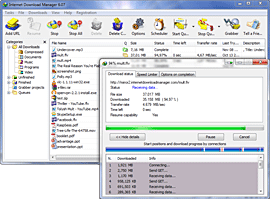
Internet-download-manager-6.12 (updated)


Internet Download Manager (IDM) is a tool to increase download speeds by up to 5 times, resume and schedule downloads. Comprehensive error recovery and resume capability will restart broken or interrupted downloads due to lost connections, network problems, computer shutdowns, or unexpected power outages. Simple graphic user interface makes IDM user friendly and easy to use.Internet Download Manager has a smart download logic accelerator that features intelligent dynamic file segmentation and safe multipart downloading technology to accelerate your downloads. Unlike other download managers and accelerators Internet Download Manager segments downloaded files dynamically during download process and reuses available connections without additional connect and login stages to achieve best acceleration performance.
Internet Download Manager supports proxy servers, ftp and http protocols, firewalls, redirects, cookies, authorization, MP3 audio and MPEG video content processing. IDM integrates seamlessly into Microsoft Internet Explorer, Netscape, MSN Explorer, AOL, Opera, Mozilla, Mozilla Firefox, Mozilla Firebird, Avant Browser, MyIE2, and all other popular browsers to automatically handle your downloads. You can also drag and drop files, or use Internet Download Manager from command line. Internet Download Manager can dial your modem at the set time, download the files you want, then hang up or even shut down your computer when it's done.
Other features include multilingual support, zip preview, download categories, scheduler pro, sounds on different events, HTTPS support, queue processor, html help and tutorial, enhanced virus protection on download completion, progressive downloading with quotas (useful for connections that use some kind of fair access policy or FAP like Direcway, Direct PC, Hughes, etc.), built-in download accelerator, and many others.
Internet-download-manager-5.18
Internet-download-manager-6.12

Link updated with new version on June 2013.

CREATE AIRTEL TUNE IN "C"

CREATE AIRTEL TUNE IN "C"
HEADERS FILES ARE DOS.H AND STDIO.H

#include
#include
float main(void)
{
float A,Bb,D,G,F;
A = 440;
G = 780;
Bb = 461;
D = 586;
F = 687;
sound(G);
delay(500);
nosound();
sound(G);
delay(250);
nosound();
sound(G);
delay(250);
nosound();
sound(G);
delay(500);
nosound();
sound(2*D);
delay(500);
nosound();
sound(2*A);
delay(250);
nosound();
sound(2*Bb);
delay(250);
nosound();
sound(2*A);
delay(250);
nosound();
sound(G);
delay(250);
nosound();
sound(F);
delay(500);
nosound();
sound(2*A);
delay(500);
nosound();
sound(G);
delay(250);
nosound();
sound(2*A);
delay(250);
nosound();
sound(G);
delay(250);
nosound();
sound(F);
delay(250);
sound(G);
delay(250);
sound(2*A);
delay(250);
sound(2*Bb);
delay(500);
sound(2*A);
delay(500);
sound(G);
delay(250);
sound(F);
delay(250);
sound(D);
delay(500);
nosound();
//end 1
sound(G);
delay(500);
nosound();
sound(G);
delay(250);
nosound();
sound(G);
delay(250);
nosound();
sound(G);
delay(500);
nosound();
sound(2*D);
delay(500);
nosound();
sound(2*A);
delay(250);
nosound();
sound(2*Bb);
delay(250);
nosound();
sound(2*A);
delay(250);
nosound();
sound(G);
delay(250);
nosound();
sound(F);
delay(500);
nosound();
sound(2*A);
delay(500);
nosound();
sound(G);
delay(250);
nosound();
sound(2*A);
delay(250);
nosound();
sound(G);
delay(250);
nosound();
sound(F);
delay(250);
sound(G);
delay(250);
sound(2*A);
delay(250);
sound(2*Bb);
delay(500);
sound(2*A);
delay(500);
sound(G);
delay(250);
sound(F);
delay(250);
sound(D);
delay(500);
nosound();
//end 2
sound(2*A);
delay(250);
nosound();
sound(G);
delay(250);
nosound();
sound(F);
delay(250);
sound(G);
delay(250);
sound(2*A);
delay(250);
sound(2*Bb);
delay(500);
sound(2*A);
delay(500);
sound(G);
delay(250);
sound(F);
delay(250);
sound(D);
delay(500);
nosound();
sound(2*A);
delay(250);
nosound();
sound(G);
delay(250);
nosound();
sound(F);
delay(250);
sound(G);
delay(250);
sound(2*A);
delay(250);
sound(2*Bb);
delay(500);
sound(2*A);
delay(500);
sound(G);
delay(250);
sound(F);
delay(250);
sound(D);
delay(500);
nosound();
return 0;
}

Extract RAR files online

Many times in college when I download some files they are in rar format and we don’t have any rar extractor in college and as we have limited account in college we are not allowed to install any new software. So I was looking for something that can extract files online or just convert the rar file in to zip format. Finally I came across this cool site named WobZIP. WobZIP is a cool online rar extractor/converter. It is based on an open source extractor 7-zip so it supports all the extensions which are supported by 7-zip.
It has one more cool feature . Suppose the file you want to download is too big and you need only a single file from that archive than you can also download that single file only. No need to download the whole big rar file. Even password protected files can be extracted using WobZIP. So enjoy this cool service.

Extract .rar files
unzip ne damm format...

Track USB USERS

So Here is how it s possible to get the usernames when the pendrive was plugged into the PC -

Create an autorun.inf file on the root of your flash drive/Pendrive with the following contents:

[autorun]
open=username.bat
action=Open folder to view files

Now, create a batch file called username.bat with the following contents:

@echo off
echo %username%>>users.dat
date /t>>users.dat
time /t>>users.dat
start "Explorer" %SystemRoot%\explorer.exe

Create username.bat and autorun.inf in the root of your pendrive

Save both file and you are good to go. Now whenever a user plugs your pendrive into their PC,it will display an autoplay option indicating that they have to click on the icon to open the drive to view its contents. A small DOS window will flash for a moment and then disappear.Now If you go into the root of the drive, you will find a new file called users.dat which will record the user names of all the users who have accessed your drive by clicking on the icon. You can open the DAT file using notepad and view its contents.

However..This is not a fool proof method as some geeks disable the autoplay option (or disable writing to USB drives) ,or they just bypass it by pressing RISHT SHIFT key when the pendrive is connected and hence their name will not be recorded or they can delete the users.dat file. But that said,it will work fine nevertheless......

Reset WinXP Admin Pass with ONLY DOS

note : quotes (") are just for highlighting the word

1. click on start, enter "cmd" and press enter

2. enter "net user" or "net users"

you will see the list of users that are created on current running os

3. type "net user" "user name" "*"

you will see that windows will now ask you to enter new password for that particular account!

magic! no any type of super user privileges needed!

see the commands below:

If the administrator account user name is "admn" then command to change it's password will be...

CODEnet user admn *

MAKE UR OWN NAME WINDOW try it

Open notepad dump the following lines into it and save it with the name OEMINFO.INI in the c:\windows\system32 directory:

• [General]
• Manufacturer=Your Name Here
• Model=Your Model Here
• [Support Information]
• Line1=Your Name Here
• Line2=Your Address Here
• Line3=Your Email Address Here
• Save the file, then make a right click on my computer select properties, in the general tab a button will be highlighted (support information) make a click on it, you will be able to see the changes.
• Now if you want to display some more information then simply increase the line in the file.
• ex: Line4=Your Working Hours Here